Carrier eSIM Onboarding Restrictions: Why 'eSIM-Only' Phones Fail to Activate on Regional Carriers and MVNOs
A technical breakdown of why factory-unlocked eSIM-only phones encounter 'IMEI Not Supported' errors on MVNOs, exploring the 3-Gate framework, host network whitelisting, TAC checks, and regulatory context.
When mobile subscribers attempt to activate an unlocked, eSIM-compatible smartphone on a Mobile Virtual Network Operator (MVNO) or regional carrier, they are frequently met with rejection messages: "IMEI Not Supported," "Device Incompatible," or automated setup loops. These onboarding failures occur even when the smartphone is fully unlocked with complete radio frequency band support for the host network.
With modern hardware configurations prioritizing digital SIM delivery—and North American iPhone 14, 15, 16, and 17 series models eliminating physical SIM trays entirely—digital onboarding rejections have become a primary friction point. While many flagship Android devices continue to offer physical SIM card slots alongside eSIM support depending on the specific model, carrier variant, and regional market, the broader industry shift toward eSIM-first provisioning makes digital onboarding failure a widespread issue across smartphone ecosystems. Resolving why digital onboarding fails requires examining device management databases, network provisioning protocols, host Mobile Network Operator (MNO) policies, and regulatory frameworks.
The Loss of the Physical SIM Safety Net
Historically, when a carrier or MVNO Bring Your Own Device (BYOD) portal rejected an International Mobile Equipment Identity (IMEI), subscribers often inserted an already activated physical SIM card into the unapproved phone. Because legacy cellular networks authenticated subscriber identity directly through the physical SIM card rather than locking service strictly to verified handset IMEIs, moving an active SIM card frequently allowed unlisted hardware to obtain network service.
On eSIM-only hardware, this traditional physical SIM swap workaround is impossible. Digital onboarding requires automated validation between the device's embedded Universal Integrated Circuit Card (eUICC), its 32-digit eUICC Identifier (EID), the digital IMEI (IMEI2 or primary IMEI1), and carrier provisioning infrastructure. If the host network or MVNO database rejects the IMEI or Type Allocation Code (TAC) upfront, profile generation is blocked before activation begins. Every device transfer or new activation on eSIM-only hardware depends entirely on passing backend database authorization and completing a remote SIM profile download.
The 3-Gate eSIM Onboarding Pipeline
Digital provisioning functions as a three-stage validation pipeline. An onboarding request must pass all three technical gates to establish network service:
| Onboarding Gate | Primary Validation Check | Onboarding Impact & Technical Mechanics |
|---|---|---|
| Gate 1: Software Lock State | Operating system software lock state verified via device activation policy / carrier lock settings. | If locked, device software refuses to install or activate a digital profile originating from a non-primary carrier. |
| Gate 2: Database Whitelisting (EIR/DMD) | Device TAC and IMEI cross-referenced against host network central databases. | If the device TAC or IMEI is unindexed in central host MNO databases, the portal halts setup and returns "IMEI Not Supported." |
| Gate 3: Provisioning Engine & Profile Delivery | SM-DP+ profile generation and GSMA TS.43 entitlement routing. | If SM-DP+ profile generation fails, activation halts. Lacking a TS.43 entitlement server shifts setup from automated push activation to manual QR code scanning or SM-DP+ address entry. |
If an onboarding request is blocked at Gate 1 or Gate 2, digital activation terminates before profile delivery begins. If Gate 3 is reached without GSMA TS.43 Entitlement Server integration, activation does not fail entirely; the carrier simply falls back to issuing a manual QR code or activation string.
Hardware Identifiers Demystified: IMEI1 vs. IMEI2 vs. EID
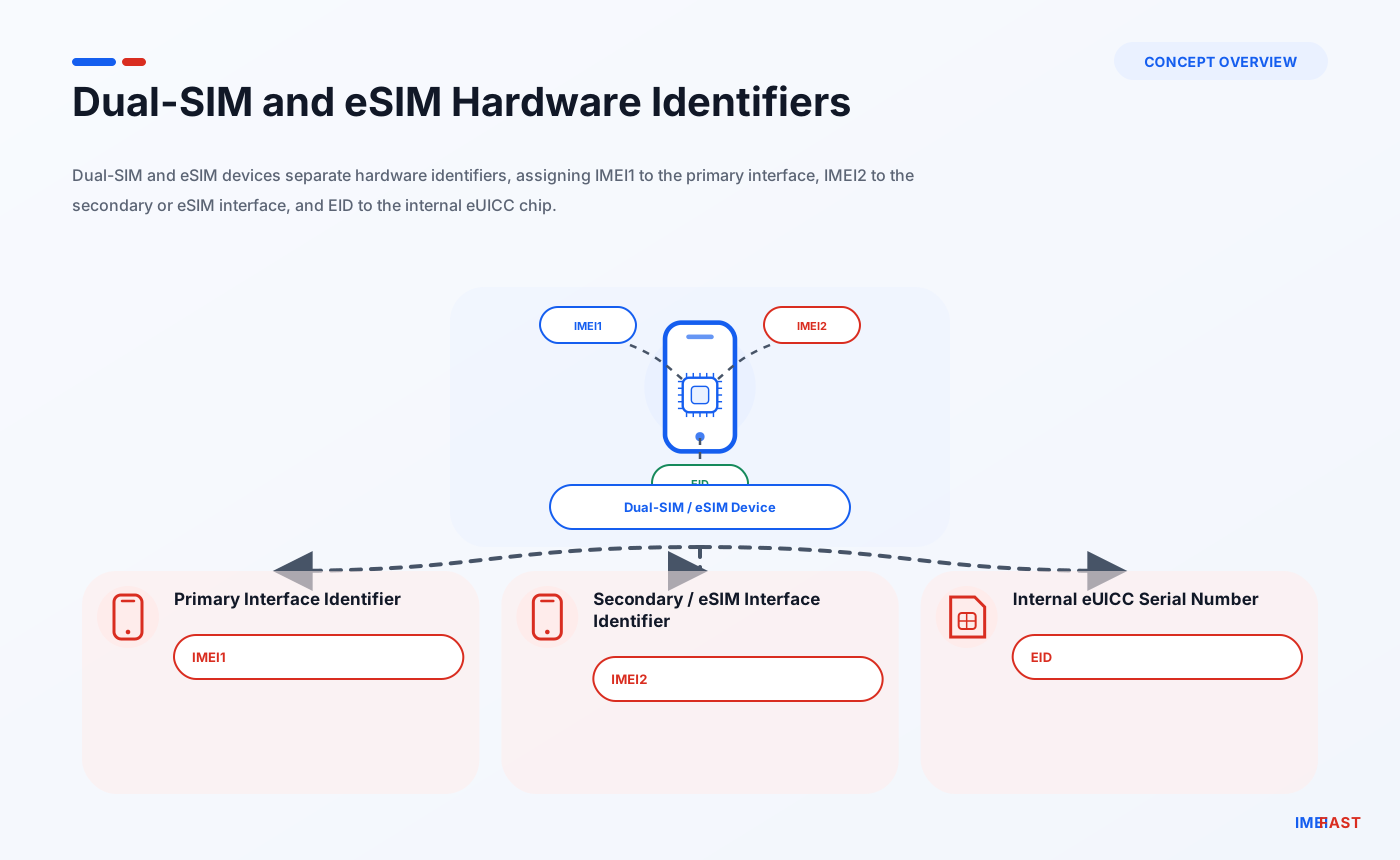
Consumer confusion during eSIM setup frequently stems from distinct hardware identifiers embedded within modern smartphones:
- IMEI1 (15 Digits): The primary cellular interface identifier, historically assigned to physical SIM slot 1 on dual-SIM devices.
- IMEI2 (15 Digits): The secondary cellular interface identifier, typically assigned to the digital eSIM interface on dual-SIM and eSIM-only models.
- EID (32 Digits): The Embedded Identity Document serial number, permanently assigned to the physical eUICC chip soldered onto the logic board.
Many MVNO Business Support Systems (BSS) were originally coded for physical SIM workflows that validated only IMEI1. Submitting IMEI1 on an eSIM onboarding page can cause legacy MVNO software to cross-reference it against physical SIM tables, resulting in rejection. Conversely, entering IMEI2 or EID into an input form expecting IMEI1 can trigger identical errors. Dialing *#06# on the keypad displays all assigned identifiers.
Database Exclusions vs. Hardware Incompatibility
When an online BYOD compatibility checker rejects an IMEI, consumers assume their phone lacks required radio frequency hardware. Modern flagship devices share global modem chipsets capable of tuning to standard LTE and 5G network bands across major wireless providers.
The vast majority of digital onboarding rejections stem from administrative components of device identity:
- Type Allocation Code (TAC) Whitelisting: The TAC represents the first 8 digits of a 15-digit IMEI. It identifies the manufacturer, model number, and regional hardware variant.
- Device Management Databases (DMD) & Equipment Identity Registers (EIR): Primary host networks maintain centralized registers of approved IMEIs and TAC ranges. If an 8-digit TAC or individual 15-digit IMEI was not pre-loaded into the host carrier's central database, downstream MVNO interfaces default to rejecting the device.
Unindexed TAC ranges frequently impact factory-unlocked global smartphone variants, unbranded open-market Android devices, and replacement devices (such as AppleCare units) whose newly assigned IMEIs experience database ingestion delays between the manufacturer and carrier backend systems.
Host Network Whitelisting and Observed Operational Trends
MVNOs do not operate physical cellular towers. Instead, they lease network capacity from primary Mobile Network Operators (MNOs)—primarily Verizon, AT&T, and T-Mobile in the United States. Because MVNOs rely on host MNO infrastructure, their online BYOD checkers execute real-time API queries against host database tables over which the MVNO has limited administrative control.
While core network protocols are standardized globally, individual host networks handle database whitelisting and device ingestion according to distinct operational policies and observed trends:
- Verizon Host Network Operational Trends: Field observations indicate that Verizon maintains a centralized Device Management Database (DMD). For a device to activate smoothly on Verizon-based MVNOs, the device’s exact IMEI or TAC range generally must be populated in Verizon's core DMD whitelist.
- AT&T Host Network Operational Trends: Based on carrier enforcement policies, AT&T cross-references devices attempting to onboard on AT&T-based MVNOs against approved TAC whitelist listings to verify network capability compliance.
- T-Mobile Host Network Operational Trends: Operational observations indicate that host network validation rules can vary in strictness across providers. Some network architectures may exhibit broader acceptance of factory-unlocked and foreign device variants during digital onboarding, though specific database validation rules remain proprietary to the host carrier and subject to change.
Additionally, major host MNOs systematically enforce network locking rules across downstream MVNOs. Locked host carrier phones are blocked from activating on downstream MVNOs until officially unlocked by the originating primary carrier.
Regulatory & Policy Landscape
Recent regulatory developments have reshaped handset unlocking policies and consumer rights, though important technical distinctions remain:
- 2024 FCC Unlocking Proposal: In July 2024, the Federal Communications Commission (FCC) issued a Notice of Proposed Rulemaking (NPRM) seeking to institute a mandatory 60-day handset unlocking requirement across all mobile service providers.
- 2026 Verizon Waiver Order: In January 2026, the FCC’s Wireless Telecommunications Bureau granted Verizon a waiver ending its mandatory automatic 60-day unlock requirement, permitting Verizon to align its locking policies with the voluntary CTIA Consumer Code (allowing locking until financing or service terms are fulfilled).
Crucially, the FCC explicitly clarifies that a software SIM unlock removes network software locks, but does not guarantee technical compatibility, frequency band support, or inclusion in a host carrier's backend device database (DMD/EIR). An unlocked device remains fully subject to host network whitelisting rules and MVNO database checks.
Core Architecture: Remote SIM Provisioning & Entitlement Systems
GSMA Remote SIM Provisioning specifications (specifically GSMA SGP.22 for consumer devices) govern how digital SIM profiles are constructed, encrypted, and downloaded:
- eUICC: The secure hardware chip soldered onto the logic board that holds digital carrier profiles.
- EID: The unique 32-digit hardware serial number assigned to the eUICC chip.
- SM-DP+ (Subscription Manager Data Preparation Plus): The GSMA-certified cloud server responsible for constructing, encrypting, and staging digital SIM profiles for secure download. Hosting an SM-DP+ server requires rigorous GSMA Security Accreditation Scheme (SAS-SM) certification, leading many regional carriers and MVNOs to lease provisioning infrastructure from host MNOs or third-party orchestrators.
- LPA (Local Profile Assistant): Operating system software running within iOS or Android that manages downloading and installing profiles onto the eUICC.
When a subscriber requests an eSIM profile, the carrier's billing engine requests an activation package from the SM-DP+ server, generating a matching ID or activation code payload. If a network interruption occurs while downloading the profile payload, the session can fail to complete, which may require requesting a replacement activation credential or re-initiating the download.
Entitlement Infrastructure: GSMA TS.43 vs. Manual QR Provisioning
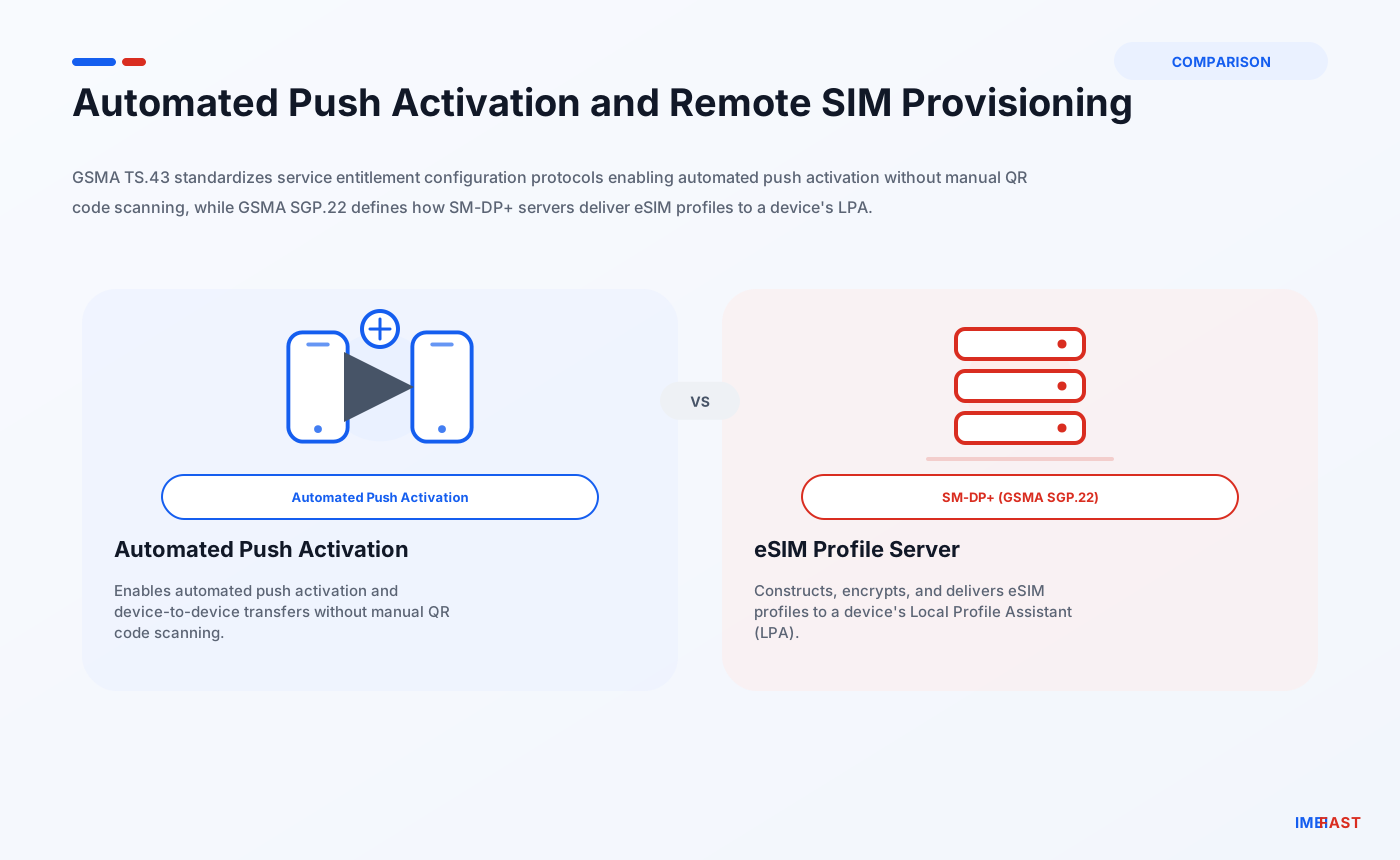
Digital onboarding workflows depend heavily on whether a carrier has integrated GSMA TS.43 Entitlement Server architecture:
- GSMA TS.43 Entitlement Server Integration: Standardized entitlement configuration protocols enable automated push provisioning ("eSIM Carrier Activation") and seamless device-to-device transfers ("eSIM Quick Transfer"). With TS.43 integration, an activation prompt appears automatically on the OS interface without requiring manual code entry.
- Manual Provisioning Workflows: MVNOs and regional carriers that lack GSMA TS.43 Entitlement Server infrastructure cannot execute automated push activations. Regardless of device brand or OS version, these providers require users to manually scan a carrier-provided QR code or manually enter the SM-DP+ server hostname (such as
rsp.provider.com) and activation matching ID into device settings.
Common Misconceptions
- Misconception: A factory-unlocked device will automatically activate on any network.
- Fact: Unlocked status simply means carrier-enforced software blocks are disabled. The target network’s central database (DMD or TAC whitelist) must still authorize the device identity.
- Misconception: A locked phone from a host carrier will work on MVNOs using that same host network.
- Fact: Host MNOs strictly enforce network locks across downstream MVNOs. A locked phone must be officially unlocked by its primary carrier before activating on an MVNO.
- Misconception: Lacking a GSMA TS.43 Entitlement Server causes an 'IMEI Not Supported' error.
- Fact: Missing TS.43 infrastructure does not reject an IMEI; it simply prevents automated push activation, forcing fallback to manual QR code scanning or manual SM-DP+ address entry.
- Misconception: The SM-DP+ server address provided during manual configuration is a website URL.
- Fact: The SM-DP+ server address (e.g.,
rsp.provider.com) is an OS-level LPA parameter used internally by cellular firmware to fetch profile payloads. It is not a web address meant to be opened in a browser.
- Fact: The SM-DP+ server address (e.g.,
- Misconception: eSIMs bypass carrier blacklists and network locks.
- Fact: Blacklisting is enforced against the modem's global IMEI. Moving from a physical SIM to an eSIM does not bypass IMEI-level blacklists or software lock states.
- Misconception: Onboarding failures indicate a defective physical eUICC chip.
- Fact: Hardware eUICC failures are extremely rare. Over 95% of activation failures stem from database mismatches, unindexed TAC entries, software locks, or network connection drops during SM-DP+ fetching.
Actionable Diagnostic & Onboarding Guide
If you encounter activation failures or "IMEI Not Supported" errors when attempting to onboard an eSIM-only or factory-unlocked device onto an MVNO, follow this systematic diagnostic process:
Step 1: Verify True Software Lock Status
Before troubleshooting database errors, confirm that the operating system is free of software carrier locks. Access your device settings menu to inspect current network lock status. Ensure the OS status confirms that no carrier restrictions or SIM locks are active. If a software carrier lock is detected, contact the original carrier to execute an official software unlock before digital onboarding can proceed.
Step 2: Confirm Modem & GSMA Blocklist Status
Confirm that the modem IMEI has not been flagged on global network blocklists due to loss or theft. Running an IMEI check or GSMA blocklist audit via diagnostic platforms like IMEIFAST helps verify that the modem is free of reported loss/theft blocklist flags or active software locks, narrowing down whether the rejection is administrative. Note that third-party blocklist checks verify global reported loss/theft status but cannot detect internal carrier billing holds or unsubmitted account-level financial flags.
Step 3: Test Both IMEI1 and IMEI2
Dial *#06# on your phone's keypad to display all hardware identifiers. On dual-eSIM devices, copy both IMEI1 and IMEI2. If an MVNO's BYOD portal rejects IMEI2, attempt submitting IMEI1 (or vice versa). Legacy MVNO billing systems often hold database records for IMEI1 ranges while omitting secondary IMEI2 entries. Additionally, when manually copying the 32-digit EID number into entry forms, verify that the string contains all 32 digits without spaces or extra characters.
Step 4: Decode Device TAC Parameters
For open-market or foreign device variants, decoding the first 8 digits of the IMEI using device intelligence tools like IMEIFAST identifies the precise OEM model number and regional hardware variant. This identifies whether the device is an international or unbranded regional variant, which indicates a higher likelihood of host MNO database exclusion. Note that while TAC lookup tools identify precise regional model specifications, they do not directly query proprietary carrier DMD internal databases or guarantee carrier acceptance.
Step 5: Understand Escalation Options and MVNO Support Limitations
If automated portals continue to reject an unlocked device, contact customer support to inquire if manual database entry is possible.
It is critical to recognize operational escalation limitations across service tiers. Primary host MNO postpaid accounts may sometimes allow Tier 2 support teams to submit manual DMD registration requests to ingest unindexed IMEIs into core carrier databases, though these escalation paths are non-guaranteed, informal, and proprietary to each carrier. Conversely, customer support representatives at budget MVNOs almost never possess direct access or authorization to submit host network database override tickets. If an MVNO support agent cannot process an automated IMEI override, the device cannot be onboarded on that specific host network until the host MNO updates its central TAC tables.
Operational Uncertainties in Digital Onboarding
While GSMA Remote SIM Provisioning technical specifications are standardized globally, several operational variables depend on proprietary carrier implementations:
- Backend Database Synchronization: Synchronization frequencies between host MNO whitelist tables and secondary MVNO validation APIs remain proprietary and undocumented.
- Entitlement Server Deployment: The exact percentage of regional carriers and budget MVNOs operating fully functional GSMA TS.43 Entitlement Servers versus manual web portal/QR code flows varies across providers.
- Support Authorization Policies: Tier-1 support representatives at primary host carriers and downstream MVNOs frequently lack authorization to process manual DMD override tickets for third-party devices.
Continue with related IMEI guides
Explore practical checks and verification guides before buying or selling a used phone.
Run a quick device screening before buying or selling a used phone.
Find out whether a phone may have been reported lost, stolen, or blocked.
Verify whether a phone is restricted to a specific mobile network.
Read the step-by-step guide to verify a phone safely before paying a seller.
More from our blog
Continue reading more IMEI, blacklist, carrier, and used phone guides.
New to eSIM? This beginner-friendly guide explains what an eSIM is, how it works, its advantages and disadvantages, and why travelers are switching to eSIM technology.
Not sure if your iPhone is locked to a carrier? This quick guide shows you how to check directly in your settings and understand what the results mean.
Your IMEI check says clean but your phone still doesn’t work? Learn the real reasons and what you can do before buying or using a device.
Wondering why the same IMEI shows different results on different websites? Learn the real reasons behind inconsistent IMEI checks and how to know which result to trust.